Turning an Old Android TV Box into a Linux Server
 by adeep ag
I had an old Hathway SEI111H set-top box sitting unused. It is an Android TV box, and its original job is no longer relevant to me. Instead of throwing it away, I wanted to find out whether it could become a small Linux server for experiments, remote administration, and maybe a few lightweight services, managed from my Windows laptop with no keyboard or mouse plugged into the TV box.
The short version: I got Ubuntu 24.04 running on it and I can reach it over SSH from my laptop. Ubuntu runs inside Android, not instead of it, and that difference is the most important thing to understand about this setup.
Why I wanted to repurpose the box
These boxes are cheap ARM computers, and this one has a wired Ethernet connection I can use for a server. They sit idle once the TV service changes or the interface gets slow. A server does not need a display, so I wanted to see how far I could push one.
My first idea was to replace Android with Linux. Before trying that, I needed to understand how much control I actually had over the device. There are three very different ways to get "Linux" on a box like this:
- Native Linux as the main OS. Linux boots directly on the hardware and replaces Android. This needs a compatible bootloader, kernel, device tree, and firmware for this exact model.
- A Linux virtual machine. A hypervisor runs a full guest kernel with its own isolation.
- A Linux userspace inside Android. Android keeps running its own kernel. An app (Termux) provides a command-line environment, and a tool (
proot-distro) places a Linux distribution's files on top of it. Programs run on Android's kernel, not a separate Linux kernel.
My current setup is the third one. Ubuntu is not replacing Android. It is a guest userspace that exists while Android and Termux are running.
PRoot does not give the isolation of a VM, the hardware access of a native install, or any control over boot. It works by intercepting system calls and faking a few things (like a root user and a different filesystem layout) for the programs inside. It is not Docker and it is not a virtual machine.
How it fits together
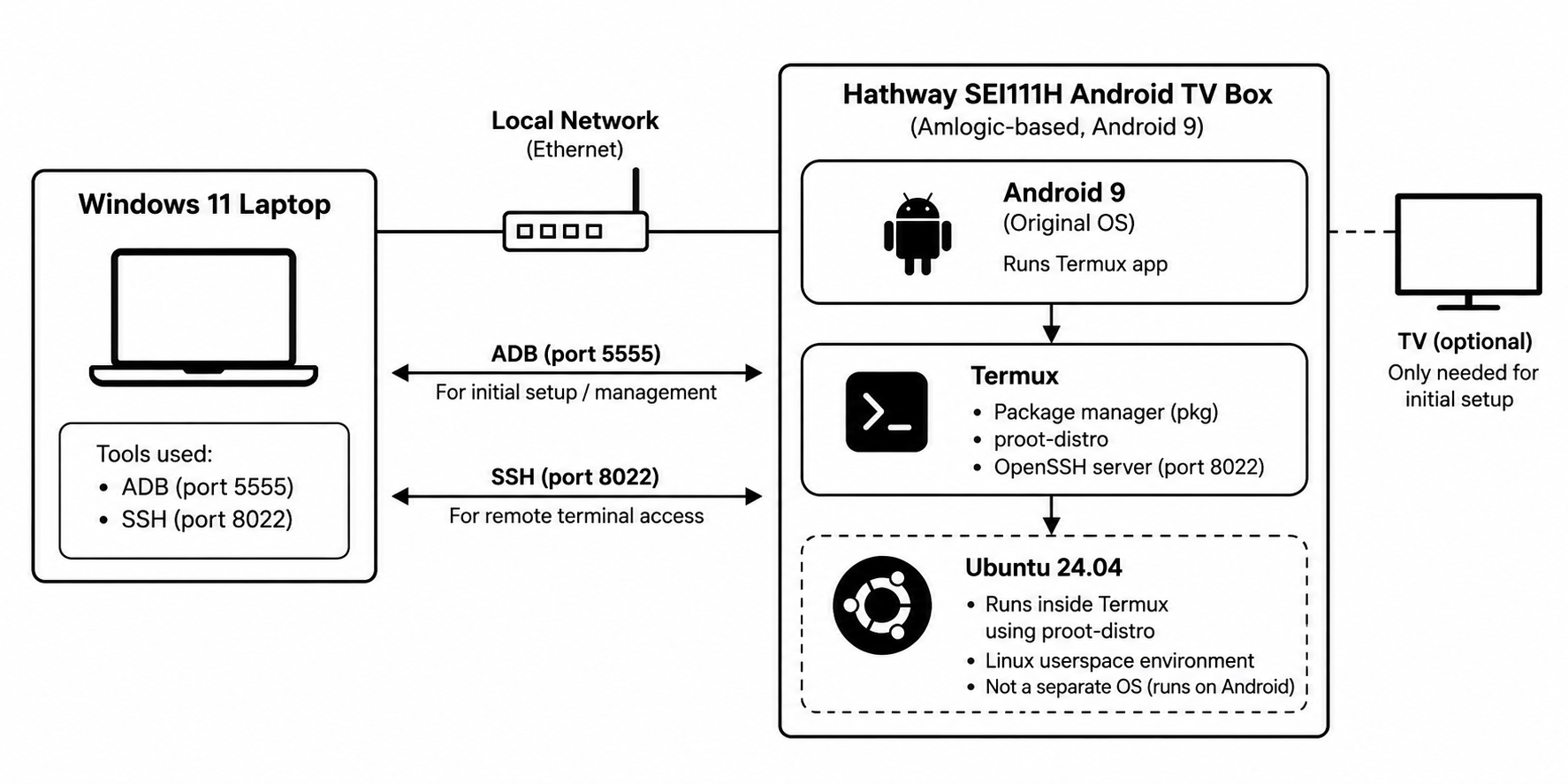
The laptop talks to Android over ADB (5555) and to Termux over SSH (8022). Ubuntu 24.04 runs inside Termux and is not a separate OS.
Understanding the hardware
I only want to state what I verified, so here is what the device itself reports:
| Item | Reported value |
|---|---|
| Device | Hathway SEI111H Android TV box |
| Platform string | AMLOGIC_805X_ATV |
| OS | Android 9 |
| Kernel | Linux 4.9.113 |
| Android app ABI | armeabi-v7a |
uname architecture |
armv8l |
The last two lines look contradictory but aren't. armv8l is what the kernel reports through the shell, and it sounds like a 64-bit-capable architecture. The Android app ABI is armeabi-v7a, which means apps on this device are 32-bit ARM. A modern-sounding architecture does not guarantee a 64-bit app environment, and that matters when picking an APK.
I am deliberately not listing a CPU model, core count, or GPU, because I have not verified them. For memory and storage I only have what Android reported while I was inspecting it:
/proc/meminfoshowed about 9.6 GiB. This is only the value Android returned, not verified physical RAM, and it needs further validation against actual memory usage before I rely on it.- The
/datafilesystem showed about 4.7 GB total. Free space changes as I install things.
Connecting through ADB
Android Debug Bridge (ADB) is the standard tool for talking to an Android device from a computer. Network ADB was available on port 5555. From the folder containing adb.exe on my Windows laptop (Command Prompt or PowerShell):
.\adb.exe connect 192.168.1.7:5555
.\adb.exe devices
.\adb.exe -s 192.168.1.7:5555 shell
192.168.1.7 is the address my router gave the box at the time. DHCP addresses can change, so use your own device's IP.
Inside the ADB shell (now running on the box), I used system properties to find out what I was dealing with:
getprop ro.build.version.release
getprop ro.product.cpu.abi
getprop ro.board.platform
getprop ro.nes.platform
getprop ro.boot.hardware
uname -a
That told me: Android 9, a 32-bit ARM app ABI, an Amlogic platform, and kernel 4.9.113.
Installing Termux
Termux gives you a package-managed command-line environment on Android without replacing the operating system. That made it a good fit for this experiment.
Because the app ABI is 32-bit ARM, I installed the matching build:
termux-app_v0.119.0-beta.3+apt-android-7-github-debug_armeabi-v7a.apk
Two cautions. First, download Android packages only from the project's official sources, and match your device's ABI. Second, not all Termux APKs are interchangeable. Different distribution channels can sign their builds with different keys.
Official project: github.com/termux/termux-app
Getting Ubuntu running
In the Termux shell on the box:
pkg install proot-distro openssh
proot-distro install ubuntu:24.04
proot-distro list
proot-distro login ubuntu
What each command does:
pkginstalls Termux packages.proot-distromanages Linux distributions inside Termux.proot-distro installdownloads and prepares the distribution.proot-distro logindrops you into it.
The install finished, the distro showed up as ubuntu, and I got a prompt like this:
root@localhost:~#
That root is not Android root. PRoot presents a simulated root user to the programs inside, while the real process is still an unprivileged Android app.
So this is Ubuntu 24.04 userspace, hosted by Termux, hosted by Android. It is useful, but it is not a standalone OS and should not be treated like a normal bare-metal Ubuntu server.
Enabling remote access with SSH
I wanted to manage the box from my laptop, not the TV. OpenSSH was installed with the pkg install line above. The commands below are the standard way to set this up, shown for reproducibility. I'm not claiming I typed them in exactly this order. What I can confirm is the end state: a password is set on the Termux account, the SSH server is running, and my Termux username is u0_a70. In the Termux shell:
passwd
sshd
whoami
passwd sets a password for the Termux account, sshd starts the server, and whoami prints your Termux username; the device reported mine as u0_a70. Termux's OpenSSH listens on port 8022 by default, not 22. From Windows:
ssh -p 8022 u0_a70@192.168.1.7
Replace the IP with your box's current address. This works for me now. Once logged in, I'm in the Termux environment. To get into Ubuntu, run this in that same SSH session:
proot-distro login ubuntu
These are two layers. SSH lands you in Termux, the host. Ubuntu is a guest that you launch from there.
Addresses can change after a reboot or DHCP lease renewal, so for anything reliable, reserve an address for the box in your router.
Security notes
- Use a strong, unique password.
- Keep both SSH and network ADB restricted to a trusted local network while experimenting.
- Do not expose SSH (port 8022) or network ADB (port 5555) directly to the public internet, including through router port forwarding.
- Move to SSH key authentication once the basics work.
- Keep the device and software updated where possible.
Current project status
Works:
- Ubuntu 24.04 runs inside Termux via
proot-distro. - ADB over the local network from Windows.
- SSH access from Windows to Termux on port 8022, then into Ubuntu.
Conclusion
Ubuntu 24.04 now runs on the old TV box through Termux and proot-distro, and I can reach it from my Windows laptop over SSH. It is a Linux userspace hosted by Android rather than a native Linux install, but it already turns the box into a small, remotely accessible Linux machine for experiments.